Running a farmer’s market stand used to be mostly about great produce, a sturdy table, and a hand-written price list. Today, customers expect to pay however they like, find you online, and get reminders when their favorite tomatoes are back in season. That creates a gap for many small growers who are great at farming but less confident with apps and software. The good news is you don’t need a full “tech stack” to run a profitable stand. With a few smart digital tools, you can tighten operations, reduce stress on market days, and turn casual browsers into repeat customers.
1. Mobile Point-of-Sale Systems: Turn Your Phone Into a Checkout Counter
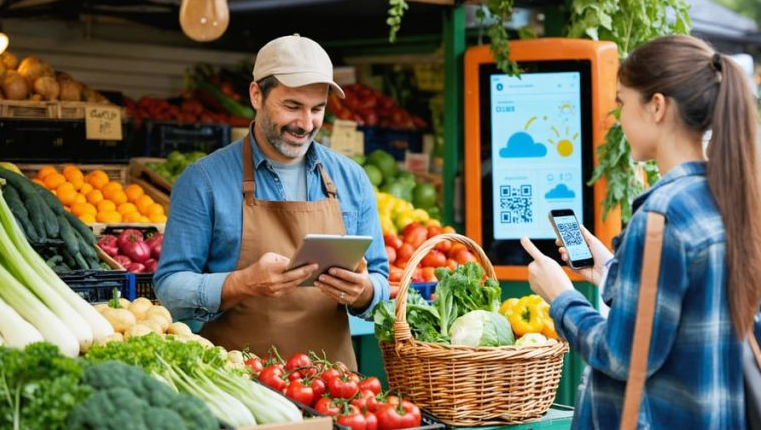
A mobile point-of-sale (POS) system lets you accept cards, tap-to-pay, and mobile wallets right from your phone or tablet. Tools like Square offer compact readers and a free POS app that fit easily in your apron pocket. You can pre-load your produce list with prices so checkout becomes fast and accurate. The POS also tracks sales by product and time of day, helping you plan your next harvest with data instead of guesswork. For most stands, the best setup is simple: phone or tablet, small reader, and a backup battery.
2. Inventory & Crop Planning Apps: Stop Guessing What to Bring
The right digital tools connect your crop plan to your market table so you bring the right mix every week. Basic POS systems or farm-market platforms track how many bunches, pints, or loaves you sell, revealing clear patterns: which items sell out early and which linger. That insight lets you adjust successions and display space smartly. Even a spreadsheet works if you track:
- Total quantity brought vs. sold.
- Time of day items sell out.
- Weather notes to spot demand patterns.
3. Email & Text List Tools: Build a Loyal Customer Base
A simple email or SMS list helps you stay connected between markets, where loyalty grows. Platforms like Mailchimp make it easy to collect sign-ups and send attractive updates. Add a QR code at your stand leading to a short form. Once people join, send short, predictable messages—like a “Friday Harvest Note.” A few ideas:
- Weekly message featuring what’s in season.
- Early pre-order alerts for high-demand products.
- Updates for extra markets or pop-ups.
Even a simple system, used consistently, keeps your stand top-of-mind.
4. Social Media & Scheduling Apps: Stay Visible Beyond the Market Gate
Customers often search “farmers market near me” or check Instagram before heading out. A basic social presence, paired with a scheduling app, keeps you visible. Adobe Express helps you format photos and text quickly for polished posts. Batch-create posts once a week and schedule them to go live automatically:
- Early-week: behind-the-scenes field shot.
- Midweek: what you’re harvesting and where you’ll be.
- Night-before: a reminder carousel showing top products.
Treat your feed like a “fresh sheet” with a touch of your story—it’s what turns scrollers into shoppers.
5. Digital Signage & Pricing Tools: Make Your Stall Easy to Shop
Clear signage boosts confidence and speeds up transactions. Even if your signs are physical, design them digitally for consistency. Use one master template for product boards so fonts and spacing stay uniform. A looping tablet slideshow can also highlight product names or recipes. Tips:
- Create templates for produce, value-adds, and bundles.
- Save editable files in the cloud for quick updates.
- Use high-contrast colors for readability outdoors.
A clear, cohesive look signals professionalism and trust.
See also: The Impact of Technology on Traditional Banking Systems
6. Accounting & Record-Keeping Apps: Know If Your Stand Is Profitable
It’s easy to feel “sold out” but not know if you’re earning enough. Simple accounting tools like QuickBooks pair with your POS to reveal real margins. Build a short weekly ritual after each market:
- Export sales by product.
- Record cash sales, fees, and expenses.
- Add notes like “basil sold out” or “too much chard.”
Over time, you’ll see which markets and products deserve more focus.
7. FAQ: Card Design for Your Farmer’s Market Stand
Cards at your farmer’s market stand can do far more than share your contact info—they can serve as mini price lists, recipe cards, loyalty punch cards, or thank-you notes tucked into CSA boxes. They help customers remember who you are, what you sell, and how to find you again online. With tools like Adobe Express, Vistaprint, Moo, GotPrint, and local print shops, you can quickly create sturdy, branded cards that match your stand’s look. Use the questions below to design cards that don’t just look good, but actively support your sales and customer relationships all season.
1. How can I design cards that bring people back?
Treat cards as invitations, not just contact slips. Highlight your farm name, add a short tagline, and include contact details or a QR code linking to your online presence. Leave space for notes like favorite items or next market dates.
2. What tools can I use if I’m not a designer?
Online tools make card design simple. Adobe Express offers templates you can personalize so that you can then print online cards directly. Vistaprint, Moo, and GotPrint offer professional printing with customizable finishes and paper types. Local printers can also help refine or resize your layouts for in-person pickup.
3. What info should be on my cards?
Include your stand or farm name, your name, and contact info. Add your market days, specialties, and a QR code linking to your website or social profile. If your card doubles as a price list or recipe card, use one side for visuals and the other for information customers want to keep.
4. How can I connect my cards with digital tools?
Keep links short and QR codes clear. Add a call-to-action like “Scan for this week’s harvest” or “Order online for next market.” Make sure the linked page is mobile-friendly for easy checkout or signup.
5. How many designs do I need?
Start with one evergreen design for year-round use, then add special editions for seasonal crops, holiday boxes, or loyalty programs. Keep your logo and colors consistent across all designs so customers recognize you instantly—even from a small card tucked into their bag.
Digital tools won’t replace good soil or personality—they amplify them. A mobile POS ensures smooth payments, while inventory and accounting apps reveal what truly profits. Email and social tools sustain your community, and strong signage and cards make you memorable. Used together, these tools turn your stand from “just a table” into a small, data-smart business that thrives every market day.